
Process Control / Ion Implantation
Tune the Machine, Keep Outcomes Consistent.
An unstable beam interrupts implantation. Combine the beam profile with machine state and health, determine the appropriate tuning response and carry it out through the equipment interface.
The Operating Sequence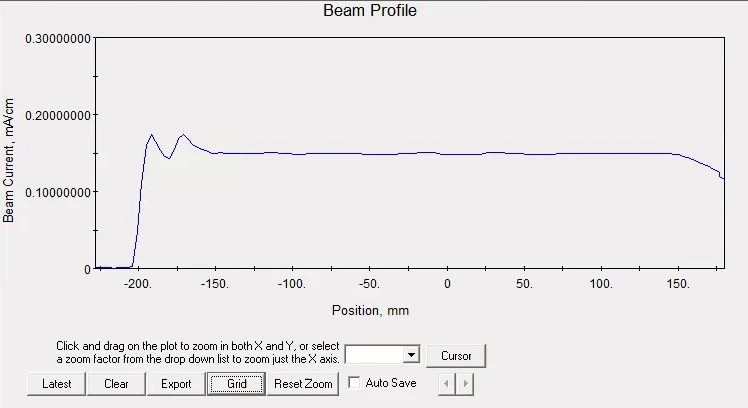
The Platforms behind the Work
A Graph Is Only Part of the Picture.
Beam-current drift, instability, poor uniformity and angle alarms require different responses. Engineers interpret the profile alongside the tool’s condition before deciding what to adjust.
This solution brings that sequence together on ion implantation equipment. The response follows the alarm and the operating procedure, with parameter limits and manual control built into the workflow.
The Operating Sequence
From Beam Evidence to a Verified Response.
Visual interpretation, industrial reasoning and equipment action work together around the same tuning task.
Read the Beam Profile
ZeroDefects interprets the graph on the equipment screen, turning its visual shape into information the tuning process can use.
Understand the Tool Condition
Insight combines the beam-profile information with machine state and health to interpret the condition and determine the tuning response.
Apply the Qualified Adjustment
Autopilot carries out the equipment procedure through the tool interface. Adjustments follow the permitted parameter ranges and operating constraints for that tool.
Check the Beam Again
Read the resulting profile and tool state. Continue the recovery procedure where appropriate, or hand the condition to an engineer when the permitted response is exhausted.
Keep the Tool within Its Operating Limits.
Different implanter families, interface versions and alarm conditions need different procedures. The workflow respects engineer control, accounts for follow-on alarms and returns unresolved conditions for manual assistance.
The Platforms behind the Work
ZeroDefects reads the beam-profile graph. It provides the visual information used in the wider interpretation.
Insight combines that information with machine state and health to determine the response.
Autopilot executes the equipment workflow and verifies the resulting state.
Bring the Expertise to the Next Task.
For another tool or alarm family, Builder Agents can adapt the visual models, analytical logic and operating workflow using representative data, equipment procedures and engineering knowledge. Qualification checks the complete loop, including parameter limits and handover conditions.
Builder Agents provide the current platform capability for adapting models and workflows. Engineers evaluate each new task before deployment.
Your Expertise. New Possibilities.