Visual Inspection / Wafer Handling
Inspect the Load before the Next Move.
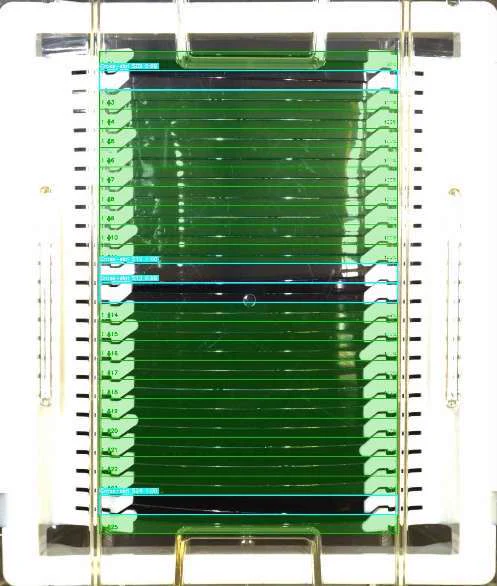
Check for crossed, doubled, extra or missing wafers. Read the lot identity and compare it with the accompanying barcode. Bring loading integrity and traceability into the same inspection task.
The Right Wafers. In the Right Slots.
Before a cassette moves downstream, its contents and identity need to agree with the intended load. A wafer in the wrong slot, two wafers together or a missing wafer changes what the next handling step will encounter.
This inspection solution combines two views of the same task. A top camera checks wafer loading; a side camera reads the lot identity for comparison with the foil-bag barcode. A dedicated station brings cameras, lighting, positioning and status indication together around the operator’s workflow.
The Operating Sequence
From Observation to Action.
Present the Cassette
Position the cassette at the inspection station and capture the load under the configured camera and lighting conditions.
Inspect the Slots
Use the top-camera image to identify crossed, doubled, extra and missing wafers against the expected loading configuration.
Check the Identity
Read the lot identity from the side-camera view and compare it with the scanned foil-bag barcode.
Make the Result Actionable
Present the inspection result and station status so the operator can address a loading or identity discrepancy before the next handling step.
Define What a Correct Load Looks Like.
Inspection rules must distinguish an expected empty slot from a missing wafer. Camera calibration, glare, cassette position and readable identity markings matter to the result. The station’s inspection outcome supports the operator’s next action; it is not a claim of automatic lot release.
Bring the Expertise to the Next Task.
ZeroDefects Builder Agents use sample images and the required inspection outcome to design an ensemble and tune the contribution of its models. For another cassette, wafer format or inspection objective, the project adapts its data pipeline and ensemble, then goes through training, validation and testing before deployment.
ZeroDefects provides the platform for developing and managing the vision pipeline; cameras and station hardware are configured for the task.
The Platforms behind the Work
ZeroDefects brings inspection models, data pipelines and their MLOps lifecycle into a project. APIs connect inference results to the inspection application and traceability workflow.
Your Expertise. New Possibilities.